An introduction to missing data in Stata
Almost every dataset will have missing data of some type. It is important that you handle that missing data appropriately in Stata and when using comparisons, it is very important that you understand Stata’s approach to handling missing data. This TechTip explains missing data in layman’s terms for Stata and then provides a simple demonstration.
Missing data
Missing data is any value that is incomplete or not represented by a value in your dataset. It can be caused by non-responses to survey questions e.g. the respondent skipped that question; or unintelligible response or invalid response e.g. yes to a question which was asking how tall is the person; or information that was just not available. Sometimes missing data is caused by measurement problems; sometimes it is caused by the instrument used to collect the data e.g. the computer was offline for that moment; or perhaps it has been removed for some reason. Essentially, missing data is everywhere.
In Stata there are two main types of missing data.
1. Missing text data. This is represented in its cell as a blank cell. There is no information for that value.
2. Missing numeric data. This is represented by a . in the cell.
When Stata sees a . in a numeric cell it does two things: a) it evaluates the . as a really large number and b) it will exclude that observation from any model where that variable is being used.
We will use Stata’s auto dataset to demonstrate.
First we should have a look at the auto dataset.
. clear all

. sysuse auto
(1978 automobile data)

. list price mpg rep78 foreign in 50/l

     +---------------------------------+
     |  price   mpg   rep78    foreign |
     |---------------------------------|
 50. |  4,723    19       3   Domestic |
 51. |  4,424    19       .   Domestic |
 52. |  4,172    24       2   Domestic |
 53. |  9,690    17       5    Foreign |
 54. |  6,295    23       3    Foreign |
     |---------------------------------|
 55. |  9,735    25       4    Foreign |
 56. |  6,229    23       4    Foreign |
 57. |  4,589    35       5    Foreign |
 58. |  5,079    24       4    Foreign |
 59. |  8,129    21       4    Foreign |
     |---------------------------------|
 60. |  4,296    21       3    Foreign |
 61. |  5,799    25       5    Foreign |
 62. |  4,499    28       4    Foreign |
 63. |  3,995    30       4    Foreign |
 64. | 12,990    14       .    Foreign |
     |---------------------------------|
 65. |  3,895    26       3    Foreign |
 66. |  3,798    35       5    Foreign |
 67. |  5,899    18       5    Foreign |
 68. |  3,748    31       5    Foreign |
 69. |  5,719    18       5    Foreign |
     |---------------------------------|
 70. |  7,140    23       4    Foreign |
 71. |  5,397    41       5    Foreign |
 72. |  4,697    25       4    Foreign |
 73. |  6,850    25       4    Foreign |
 74. | 11,995    17       5    Foreign |
     +---------------------------------+

. summarize price mpg rep78 foreign

    Variable |        Obs        Mean    Std. dev.       Min        Max
-------------+---------------------------------------------------------
       price |         74    6165.257    2949.496       3291      15906
         mpg |         74     21.2973    5.785503         12         41
       rep78 |         69    3.405797    .9899323          1          5
     foreign |         74    .2972973    .4601885          0          1

. codebook rep78

----------------------------------------------------------------------------------------------------
rep78                                                                             Repair record 1978
----------------------------------------------------------------------------------------------------

                  Type: Numeric (int)

                 Range: [1,5]                         Units: 1
         Unique values: 5                         Missing .: 5/74

            Tabulation: Freq.  Value
                            2  1
                            8  2
                           30  3
                           18  4
                           11  5
                            5  .
Look at the output of the list command above. You will note that for the variable rep78 some of the observations are recorded with a . This is because for five observations in the dataset the value rep78 is unknown. Their values are missing.
When you review the output of the summarize command you will note the observation count on rep78 is 69, while on price, mpg and foreign the observation count is 74.
Managing conditions in Stata where there is missing data
We know from the output of the codebook command above that there are 5 record types for rep78 - 1, 2, 3, 4 and 5 - essentially very poor (1) to very good (5).
A condition such as rep78 > 4 looks as though it should select only cars with a repair rating of 5. However, Stata also selects cars whose repair rating is missing. This example shows why the distinction matters and how to avoid unexpected results. e.g.
. count if rep78 > 4
  16
This gives us a count of 16. But we know that there are 11 cars with a repair record of 5 and we can confirm this with a simple frequency count on rep78.
. sysuse auto, clear
(1978 automobile data)

. table (rep78)

-------------------------------
                   |  Frequency
-------------------+-----------
Repair record 1978 |
  1                |          2
  2                |          8
  3                |         30
  4                |         18
  5                |         11
  Total            |         69
-------------------------------
However, if we change our table to include missing values we see something different: There are 11 observations with a rating of 5, and five observations for which rep78 is missing.
. sysuse auto, clear
(1978 automobile data)

. table (rep78), missing

-------------------------------
                   |  Frequency
-------------------+-----------
Repair record 1978 |
  1                |          2
  2                |          8
  3                |         30
  4                |         18
  5                |         11
  .                |          5
  Total            |         74
-------------------------------
Two conditions that look similar
Compare the number of cars selected by the two expressions:
. count if rep78 > 4
  16

. count if rep78 == 5
  11
The first command selects 16 observations; the second selects 11. Stata sorts numeric missing values above all nonmissing numeric values. As a result, the value . satisfies rep78 > 4, even though it is not a valid repair rating.
Plot 1: rep78 > 4 includes missing ratings
The missing graph option is important here: it ensures missing values of rep78 are visible as their own category.
. graph bar (count) price if rep78 > 4, over(rep78) missing ///
blabel(bar, format(%9.0f)) ///
title("Selection: rep78 > 4") ///
subtitle("The missing category is included") ///
ytitle("Number of cars") ///
name(rep_gt4, replace)
. graph bar (count) price if rep78 == 5, over(rep78) missing ///
blabel(bar, format(%9.0f)) ///
title("Selection: rep78 == 5") ///
subtitle("Only the recorded rating of 5 is included") ///
ytitle("Number of cars") ///
name(rep_eq5, replace)
. graph combine rep_gt4 rep_eq5, name(combined_graph)
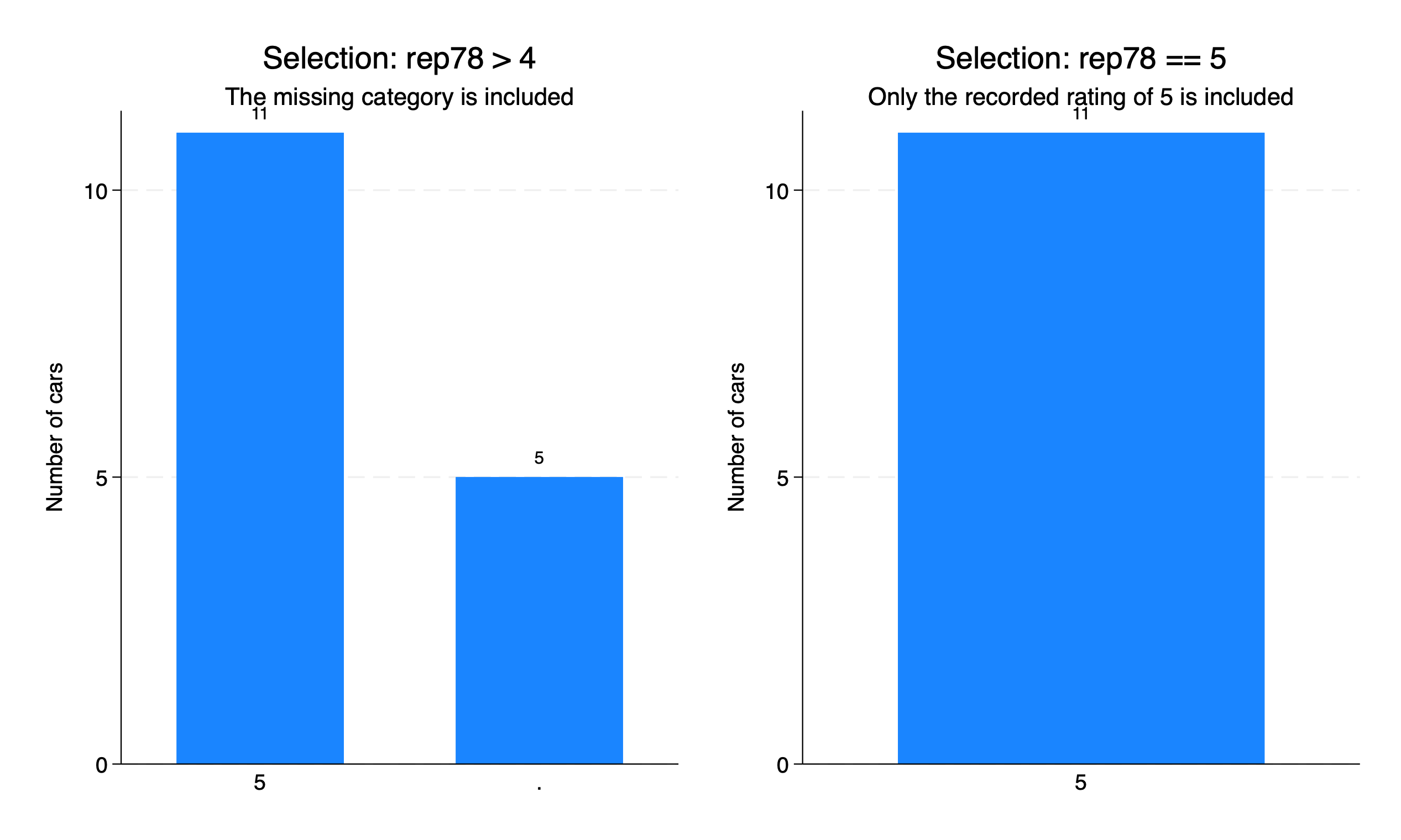
The plot shows both rep78 > 4 and rep78 == 5. Note that one has 16 and the one has 11.
A safer condition for valid numeric ratings
If you want ratings above 4 but only where the value is recorded, explicitly exclude missing values:
. count if rep78 > 4 & !missing(rep78)
  11

. assert rep78 == 5 if rep78 > 4 & !missing(rep78)
This returns 11 observations in the auto dataset. The function missing() also recognises extended numeric missing values (.a to .z) and, when used with a string argument, empty strings.
Key lesson: In Stata, a numeric missing value is not treated as zero or as an ordinary unknown in logical comparisons. For numeric threshold conditions such as x > 4, explicitly decide whether missing observations should be excluded. Using !missing(x) makes that intention clear.
Also note that different software handles missing values differently, and your analyses will need to determine how best to handle the missing data in your work. Missing data is not just 0 and it is not just replaced. Each analysis is different and needs careful attention to handling missing data.
Further reading: Stata Functions Reference Manual and Stata Graphics Reference Manual — graph bar.