The Putdocx Command - Add a Cross-tabulation to Your Document
The putdocx command allows you to create a word document entirely from within Stata. For Stata v17 and newer, you can add cross-tabulations created with the table command directly to your document with the putdocx collect command. The table command now supercedes the tabulate command in this regard. For more information on how to add different types of tables check out this Putdocx Command blog post.
How to Use:
For one-way tables:
putdocx clear
putdocx begin
table var1
putdocx collect
putdocx save document name
For two-way tables:
putdocx clear
putdocx begin
table var1 var2
putdocx collect
putdocx save document name
Worked Example 1:
For this example I am going to use the Stata example dataset auto.dta, and I am going to generate a one-way table of frequencies for the rep78 variable, followed by a two-way table of frequencies for the rep78 variable by the foreign variable. The rep78 variable has 5 repair record ratings, with 1 being the worst and 5 being the best.
. sysuse auto, clear
(1978 automobile data)

. putdocx clear

. putdocx begin

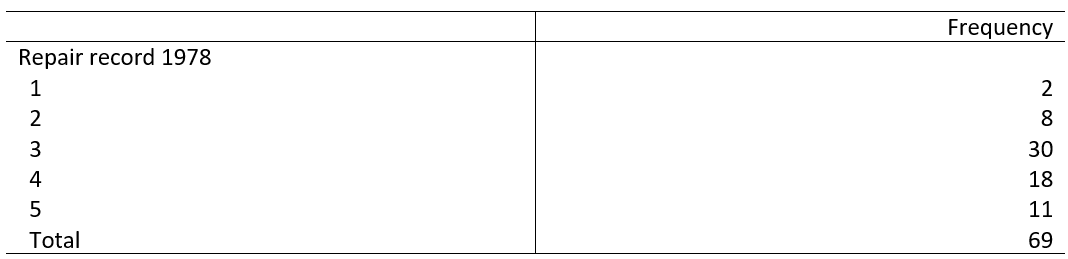
. table rep78

-------------------------------
                   |  Frequency
-------------------+-----------
Repair record 1978 |
  1                |          2
  2                |          8
  3                |         30
  4                |         18
  5                |         11
  Total            |         69
-------------------------------

. putdocx collect
(collection Table posted to putdocx)

. putdocx save C:/Users/Public/oneway
successfully created "C:/Users/Public/oneway.docx"
This first table appears in the MS Word document oneway.docx
. putdocx clear

. putdocx begin

. table rep78 foreign

------------------------------------------------
                   |          Car origin
                   |  Domestic   Foreign   Total
-------------------+----------------------------
Repair record 1978 |
  1                |         2                 2
  2                |         8                 8
  3                |        27         3      30
  4                |         9         9      18
  5                |         2         9      11
  Total            |        48        21      69
------------------------------------------------

. putdocx collect
(collection Table posted to putdocx)

. putdocx save C:/Users/Public/twoway
successfully created "C:/Users/Public/twoway.docx"
This second table appears in MS Word document twoway.docx

Worked Example 2 - Percent for Oneway Tables:
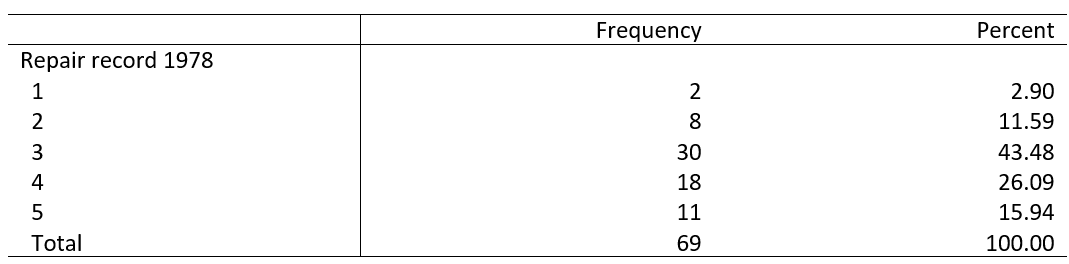
As you can see from example 1 the percent for each category of one-way tables is not shown automatically like it is for the tabulate command. You can have these added to your table with the statistics option.
. putdocx clear

. putdocx begin

. table rep78, statistic(frequency) statistic(percent)

-----------------------------------------
                   |  Frequency   Percent
-------------------+---------------------
Repair record 1978 |
  1                |          2      2.90
  2                |          8     11.59
  3                |         30     43.48
  4                |         18     26.09
  5                |         11     15.94
  Total            |         69    100.00
-----------------------------------------

. putdocx collect
(collection Table posted to putdocx)

. putdocx save C:/Users/Public/oneway2
successfully created "C:/Users/Public/oneway2.docx"
This table appears in the MS Word document oneway2.docx