Missing data in regression models
Missing data affects more than summaries and conditional selections. Missing data on observations also changes the selection of observations used to estimate regression models. It is important to understand this, and its impact on your modelling as two models fitted to the same dataset may describe different groups of observations, even when we have not deliberately filtered the data.
In this TechTip, we use Stata’s built-in auto dataset to examine the impact of a variable having missing values when that variable is added to a regression. We will compare two models, identifying the cars excluded, and plotting the observations included and omitted. The purpose of this is to demonstrate the role of the estimation sample. Note: In this TechTip we do not assess the cause of the missing data, or attempt to infer values, we just demonstrate the impact of missing values on models.
To understand the steps to identify missing data and Stata’s approach to missing data, read our earlier TechTip, An introduction to missing data in Stata. It explains Stata’s numeric missing-value notation and handling missing numeric data in comparisons.
1. What happens to missing values in regression?
When performing a regression you can use the full population of your dataset or a subset. The observations included in the regression will impact your results. For example you could use all 74 cars in the auto dataset, or your could limit it to just the first 20, or just foreign cars. Your selection will change the results.
To perform a regression, valid values are require for the dependent variable (the Y side / left hand side of the equation) and for every independent variable (the X side / right hand side of the equation ). If one required value (either on the left or the right) is missing, Stata excludes that entire observation from the estimation of that model.
This is often called complete-case analysis or listwise deletion. It is done for the variables used by the particular estimation command.
Consequently, the number of observations used by a model can be smaller than the number of rows in the dataset.
2. Explore the auto dataset
We will use price (vehicle price) as the dependent variable, and mpg (fuel economy), weight (vehicle weight), and rep78 (1978 repair record) as independent variables. We use i.rep78 to treat the repair record as a categorical predictor; the focus of this TechTip is the missing data, rather than interpretation of those coefficients.
First, load the data and check the observations available for each variable.
. sysuse auto, clear
(1978 automobile data)

. count
  74

. summarize price mpg weight rep78

    Variable |        Obs        Mean    Std. dev.       Min        Max
-------------+---------------------------------------------------------
       price |         74    6165.257    2949.496       3291      15906
         mpg |         74     21.2973    5.785503         12         41
      weight |         74    3019.459    777.1936       1760       4840
       rep78 |         69    3.405797    .9899323          1          5

. count if missing(rep78)  // this is a count of the cars for which there is no rep78 data
  5

. count if !missing(rep78) // this is a count of the cars for which there is rep78 data
  69
There are 74 cars in this dataset. The variables price, mpg, and weight each have 74 valid observations. However, the variable rep78 is missing for 5 cars and is therefore only has valid observations on 69 cars.
You can see the affected cars directly:
. // show the variables make, price, mpg, weight and rep78 for those observations where there is no data
. list make price mpg weight rep78 if missing(rep78), noobs

  +-----------------------------------------------+
  | make             price   mpg   weight   rep78 |
  |-----------------------------------------------|
  | AMC Spirit       3,799    22    2,640       . |
  | Buick Opel       4,453    26    2,230       . |
  | Plym. Sapporo    6,486    26    2,520       . |
  | Pont. Phoenix    4,424    19    3,420       . |
  | Peugeot 604     12,990    14    3,420       . |
  +-----------------------------------------------+
These five cars still have valid data for price, mpg, and weight. However, they are missing repair record values (rep78). This means that these observations cannot be included in a regression where rep78 is used in the model.
3. Compare two regressions
Let’s first fit a model using only the variables with complete data:
. regress price mpg weight

      Source |       SS           df       MS      Number of obs   =        74
-------------+----------------------------------   F(2, 71)        =     14.74
       Model |   186321280         2  93160639.9   Prob > F        =    0.0000
    Residual |   448744116        71  6320339.67   R-squared       =    0.2934
-------------+----------------------------------   Adj R-squared   =    0.2735
       Total |   635065396        73  8699525.97   Root MSE        =      2514

------------------------------------------------------------------------------
       price | Coefficient  Std. err.      t    P>|t|     [95% conf. interval]
-------------+----------------------------------------------------------------
         mpg |  -49.51222   86.15604    -0.57   0.567    -221.3025     122.278
      weight |   1.746559   .6413538     2.72   0.008      .467736    3.025382
       _cons |   1946.069    3597.05     0.54   0.590    -5226.245    9118.382
------------------------------------------------------------------------------
Look at the Number of obs in the regression output: 74 observations contribute to this model.
Now add the repair-rating variable:
. regress price mpg weight i.rep78

      Source |       SS           df       MS      Number of obs   =        69
-------------+----------------------------------   F(6, 62)        =      6.03
       Model |   212481723         6  35413620.6   Prob > F        =    0.0001
    Residual |   364315236        62  5876052.19   R-squared       =    0.3684
-------------+----------------------------------   Adj R-squared   =    0.3073
       Total |   576796959        68  8482308.22   Root MSE        =    2424.1

------------------------------------------------------------------------------
       price | Coefficient  Std. err.      t    P>|t|     [95% conf. interval]
-------------+----------------------------------------------------------------
         mpg |   -63.0971   87.45276    -0.72   0.473    -237.9127    111.7185
      weight |   2.093066    .636901     3.29   0.002     .8199193    3.366213
             |
       rep78 |
          2  |   753.7024   1919.763     0.39   0.696    -3083.849    4591.254
          3  |   1349.361   1772.706     0.76   0.449    -2194.228     4892.95
          4  |    2030.47    1810.09     1.12   0.266    -1587.848    5648.788
          5  |    3376.91    1900.17     1.78   0.080    -421.4749    7175.296
             |
       _cons |  -598.9665   3960.904    -0.15   0.880    -8516.701    7318.768
------------------------------------------------------------------------------
The number of observations falls to 69. The five cars with missing rep78 cannot contribute to this second regression, even though their prices, fuel economy and weights are known.
Important: Stata has not removed five cars from memory. They are simply not included in this model’s estimation sample. Also, the model has changed in two ways: we added a predictor and changed the observations used. A difference between the two sets of regression coefficients therefore cannot be attributed solely to the additional predictor.
4. Identify exactly which observations Stata used
After an estimation command such as regress, Stata provides e(sample). This evaluates to 1 for observations included in the most recently fitted model and 0 for other observations.
We should save that indicator immediately, before running a different estimation command.
. generate byte regression_sample = e(sample)

. table (regression_sample) () ()

------------------------------
                  |  Frequency
------------------+-----------
regression_sample |
  0               |          5
  1               |         69
  Total           |         74
------------------------------

. list make rep78 if !regression_sample, noobs

  +-----------------------+
  | make            rep78 |
  |-----------------------|
  | AMC Spirit          . |
  | Buick Opel          . |
  | Plym. Sapporo       . |
  | Pont. Phoenix       . |
  | Peugeot 604         . |
  +-----------------------+
The table identifies 69 included observations and 5 excluded observations. The list shows that the excluded cars have missing values for rep78.
We can check this directly:
. assert missing(rep78) if !regression_sample

. assert !missing(price, mpg, weight, rep78) if regression_sample
If these checks produce no error, they confirm that, in this example, the missing repair ratings explain the difference between the dataset and the second regression sample. Of course, this analysis does not tell us why those ratings are missing, it just tells us that the values are missing.
5. Plot the observations used and excluded
A graph makes the distinction particularly clear. Below, we plot vehicle price against fuel economy, using different symbols for cars included in the second regression and cars excluded because of missing repair ratings.
Although the excluded cars do not contribute to the second regression, they still have known price and mpg values and therefore appear on this graph.
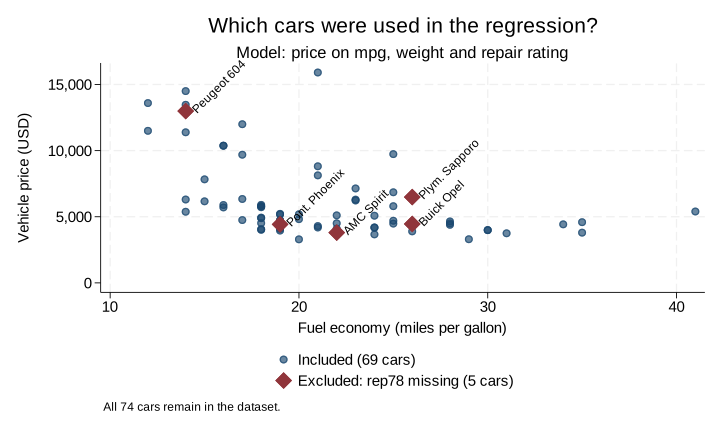
The five contrasting symbols are the cars Stata omitted from the model. They are not necessarily unusually priced cars, and they have not disappeared from the dataset. The graph illustrates sample membership, not the fitted regression relationship.
The key point is that missingness in one predictor determines whether an otherwise complete observation is used by this model.
6. Compare models on the same observations
Sometimes we want to compare regression models without also changing the sample. One simple way to do this here is to rerun the first model on the exact observations used by the second model.
Because we saved regression_sample, we can do that without deleting any data:
. regress price mpg weight if regression_sample

      Source |       SS           df       MS      Number of obs   =        69
-------------+----------------------------------   F(2, 66)        =     14.19
       Model |   173465736         2    86732868   Prob > F        =    0.0000
    Residual |   403331223        66  6111079.13   R-squared       =    0.3007
-------------+----------------------------------   Adj R-squared   =    0.2795
       Total |   576796959        68  8482308.22   Root MSE        =    2472.1

------------------------------------------------------------------------------
       price | Coefficient  Std. err.      t    P>|t|     [95% conf. interval]
-------------+----------------------------------------------------------------
         mpg |   -20.7178   86.23695    -0.24   0.811    -192.8954    151.4598
      weight |   1.888939   .6380781     2.96   0.004     .6149747    3.162903
       _cons |   859.8055   3595.098     0.24   0.812    -6318.039     8037.65
------------------------------------------------------------------------------
This model now uses 69 observations, even though rep78 is not included. We have deliberately restricted it to the second model’s sample.
We can then refit the model that includes repair rating:
. regress price mpg weight i.rep78 if regression_sample

      Source |       SS           df       MS      Number of obs   =        69
-------------+----------------------------------   F(6, 62)        =      6.03
       Model |   212481723         6  35413620.6   Prob > F        =    0.0001
    Residual |   364315236        62  5876052.19   R-squared       =    0.3684
-------------+----------------------------------   Adj R-squared   =    0.3073
       Total |   576796959        68  8482308.22   Root MSE        =    2424.1

------------------------------------------------------------------------------
       price | Coefficient  Std. err.      t    P>|t|     [95% conf. interval]
-------------+----------------------------------------------------------------
         mpg |   -63.0971   87.45276    -0.72   0.473    -237.9127    111.7185
      weight |   2.093066    .636901     3.29   0.002     .8199193    3.366213
             |
       rep78 |
          2  |   753.7024   1919.763     0.39   0.696    -3083.849    4591.254
          3  |   1349.361   1772.706     0.76   0.449    -2194.228     4892.95
          4  |    2030.47    1810.09     1.12   0.266    -1587.848    5648.788
          5  |    3376.91    1900.17     1.78   0.080    -421.4749    7175.296
             |
       _cons |  -598.9665   3960.904    -0.15   0.880    -8516.701    7318.768
------------------------------------------------------------------------------
Both models now use the same 69 cars. Their coefficients may still differ, but a change in which cars were analysed is no longer part of the comparison.
This is useful when assessing the effect of adding predictors to a model. However, restricting both models to complete cases does not solve possible bias arising from missing data, and it may discard useful observations. The appropriate approach depends on why values are missing and on the purpose of the analysis.
7. What should you remember?
- Check
Number of obsin your regression output. It refers to observations used for estimation, not necessarily the number in the dataset. - Check missingness across all model variables. Even one additional predictor can reduce the estimation sample.
- Use
e(sample)immediately after estimation to identify the observations used. Save it as a variable before fitting another model. - Be careful comparing coefficients from models with different samples. The sample change and the model change can both affect the results.
- Do not automatically replace missing values with zero or delete records permanently. Those actions can change the meaning of your data and the results.
For more on the missing-value notation and comparison conditions that underpin this example, see An introduction to missing data in Stata.